Reader…

I’ve liked books since I was a kid. In 5th grade when the other kids wanted to play kickball, I had my nose buried in a biography of Douglas MacArthur. Seems I could never walk by a book store without at least popping in for a look and I would never have dreamt of leaving the house without a least one book stashed somewhere. Unfortunately, stashed is usually where they would end up staying. It would take me months to read a book carving out five or ten minutes at a time to focus on it.

I’ve been hesitant, even hostile, to the idea of using an e-reader. In fact, I blasted the concept pretty roundly right here not so very long ago. The historian in me couldn’t quite come to terms with the idea that books could be anything other than words printed on paper and bound. It seems that, at least in this case, I may have been misinformed.

I’ve bene regularly using the Kindle app on my iPad for the last few months and my book consumption has been way up. As much as I hate to admit it, it just makes reading more convenient. Since the Kindle app crosses devices, I can start a page on my iPad and then finish the same page on my iPhone without missing a word. The app records where I stopped and picks up there regardless of what device I happen have in my hand. Add in over-the-air downloads from Amazon and it’s pure convenience… and we all know how I feel about that.

The e-reader has basically replaced the printed book for me. I don’t anticipate that the books filling shelves in the office will ever go anywhere, but I definitely won’t be adding to their number nearly as often. Of course some titles aren’t electronic and some may never be, so I suspect that there will always be room in my heart for both print and electronic books, but for sheer ease of use, I’m officially leaning way into the electronic camp. If you’re a reader and haven’t given it a chance yet, I think you’ll be pleasantly surprised.

Hands on…

The first thing I thought when iPhone 4 came out of the box was how elegant the design was compared to the previous three iPhones. In keeping with most of Apple’s other products, excluding iPad, the new iPhone fits right into the same industrial design family. I mean it. This thing looks so good that even I don’t want to run out and put a case on it… and I’ve got serious paranoia about unnecessary phone nudity. Design features aside, it feels like a remarkably sturdy build in your hand, if a touch heavier than you think it would be. No complaints at all about design or build quality. Overall, iPhone 4 feels and looks like a very solid product.

iPhone users have gotten use to the fact that we sacrifice battery life to get alot of functionality. While it isn’t an epic improvement, I’ve been rather impressed with battery life so far. After five hours of heavy use – and I mean non-stop switching apps, moving things into folders, setting up several email accounts, and basically poking every button I could find – the phone is at 53%. That’s pretty respectable considering even with iPad doing some of the heavy lifting this morning, my was under 35 % after five hours of moderate use. Not ground breaking, but a definite incremental improvement.

I should have probably led off with this, but the screen is probably something that needs to be seen to be believed. It is smooth as silk and renders graphics beautifully. Colors are deep and rich and it seems you can zoom in basically forever on text and not lose fidelity. Truly the display might be the big “wow” for this phone. likewise, the new processor and increased memory make iPhone 4 very responsive to inputs. So far today I haven’t seen any hang ups or lag at all. Add that with the upgraded camera and it’s a real win. I’ve taken pictures with the phone today that are getting dangerously close to the quality taken by my actual camera.

Finally, there’s the upgraded OS that deserves alot of the credit for making iPhone 4 what it is. iOS4 delivers alot of the features that users have been waiting for – folders, basic multitasking, unified inbox (I’m still waiting on personalized notification sounds, Apple), and a laundry list of other small improvements. I should probably spend alot more time talking about the OS, but, and I hate to say this, “it just works” so I haven’t really spent all that much time thinking about it.

Ironically, I have spent no actual time using my new iPhone 4 as an actual phone (unless you count texting as a phone function). Honestly, I don’t use the phone that much, though I understand there have been some marginal improvements in call quality. Likewise, I haven’t used the front facing camera yet other than to switch it on long enough to determine that there was, indeed, a front facing camera. There are a host of other features I either haven’t found, don’t feel like commenting on, or are basically just “settings” type changes. You can be sure there will be plenty more comments as I spend the next few days living with the phone and getting a better feel for its personality.

For me, the bottom line: My name is Jeff and I endorse this product. If my personal seal of approval isn’t good enough for you and you’re still on the fence about iPhone 4, take a trip to AT&T (God help you) or your local Apple store in a few weeks and see one in person before you rule it out. I think you’ll be pleased. I know I am.

Finding a place in line…

I’ll be doing a live blog this morning from the Apple Store in Memphis. Sure, I could have ordered for home delivery, but I actually enjoy the festivities at the store on release days. With a reservation, standing in line isn’t strictly necessary, but it’s become part of my summer routine. It’s a good day to nurture your inner geek. More to come after I’ve stopped for coffee and checked out how things are playing out at the store.

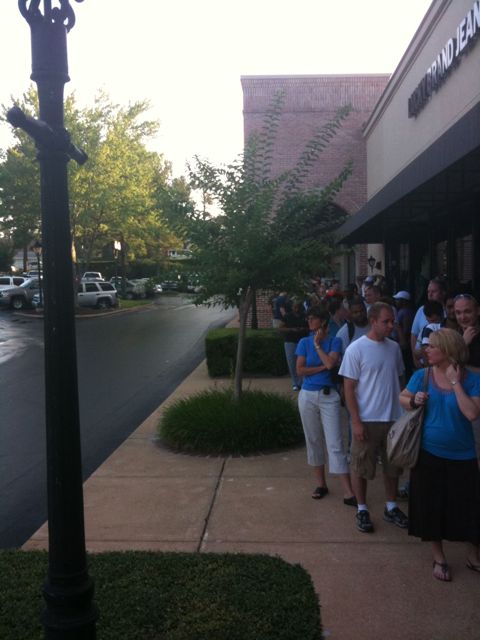
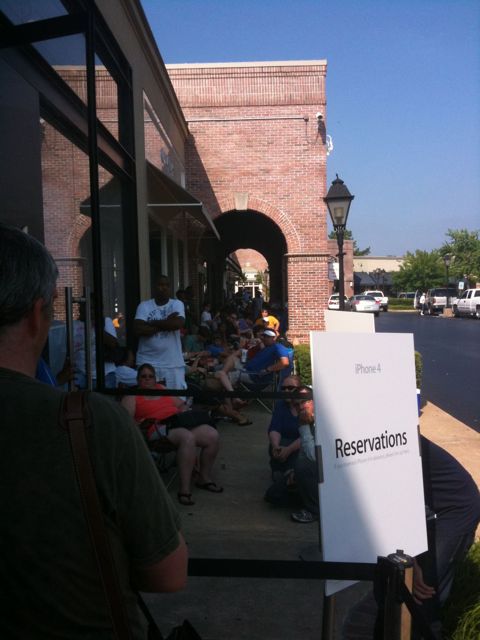
5:20: arrived at Apple Store. Wow. Not like other launch days where I got here an hour early and was 20th in line. I’m probably 200th in the “reserved” line. The walk-up line snakes out of sight in the other direction. Does that make me one of the lucky ones. Looking like the potential for a long morning here.

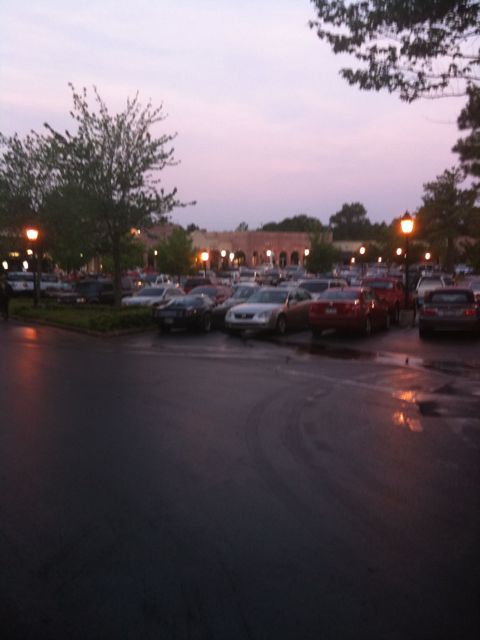
Don’t believe me? Here’s a shot if the parking lot… And at 5:40, there are definitely no other stores even thinking about opening yet.

6:30 – About to do the window reveal at the store. Can hear the cheers inside the building. Curtain drops… And predictably the crowd goes wild.

6:32 – seems like I’ve lost the content posted around 6:00 – the short version is: the ambulance showed up for a geek who was overcome, Memphis news is reporting live about a bunch of Anglos standing in line in the suburbs, and there is no parking anywhere in the mall lot. Good stuff.

6:59 – about to be open for business. The end of both lines now goes around behind both wings of the building. For the record. It’s a big building

7:03 – and we’re open for business.

7:30 – and we’re moving right along. I’ve probably moved half the distance to the store now, which isn’t awful considering volume. It’s awfully slow going for the other line, but I admire their optimism. Word from someone who just came out of the store is that activations are “going pretty slow,” a phrase that makes me more than a little nervous.

7:50 – Maybe I spoke too soon. The line hasn’t moved in 20 minutes. Not good.

8:18 – Looks like 45-50 people still ahead of me in line, but the number behind me keeps getting longer. Easily 200+ in the reserved line now, but it appears that the tail end of the walk-in line has wise up and people have started drifting off. Reliable ETA on being out the door is still too tough to calculate.

8:51 – 25 people +/- ahead of me now. Finally made it to the front of the store and back into the shade. Don’t fool yourself, the morning sun in Memphis will peel the hide off ya.

9:30 – front of the line. The look on the faces of those who didn’t preorder is priceless. See below:

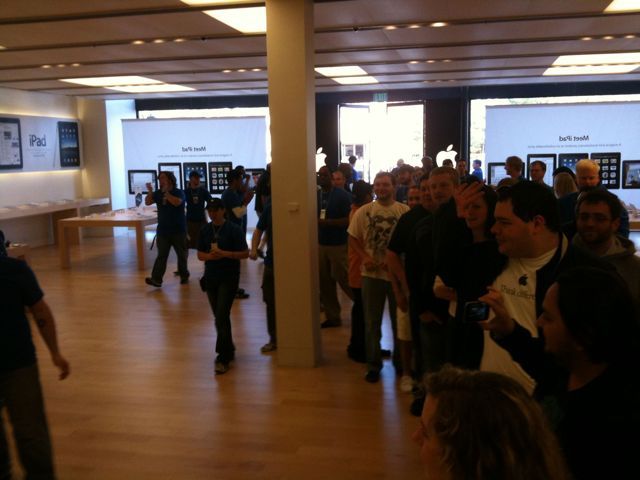
9:33 – heading inside. That’s it from the launch in Memphis. I have a few stops to make on the way to the house, but there’ll be more updates once I’m all synced up.

Starting strong…

If nothing else, I can say that I started the day strong. When others were getting booted and being timed out on the AT&T and Apple websites, I managed to reserve my iPhone 4 for pick up next Thursday. By 5:50 this morning, I had my confirmation email and realized, somewhat disturbingly, that I had reached what was likely to be the high point of the day. Seriously, on a work day, what’s going to be better then the moment you confirm that you’re going to have your hands on this summer’s neatest new toy?

All I need to do now is show up, hand over $199 + tax, sign a new two year contract that I have no intention of staying in longer than a year, and wait in line for the 7 AM opening of the local Apple Store. It’s like any other high holy day, except with bottled water and granola. And it’s possibly the only time of year when I don’t really mind standing in line and being forced to socialize with total strangers. Of course then there’s the inevitable anger when iTunes grinds to a halt under the volume of people trying to activate new phones. That’s part of the price of being a ridiculously early adopter.

Despite what I consider one of the better starts, the day ended, as most days do… with my being annoyed. However, I wasn’t violently annoyed in that wanting to bludgeon someone with a desk chair kind of way, so perhaps I’m making progress and getting through the anger stage into acceptance… or is that indifference? Eh, who can tell the difference anyway. See, I’m growing as a person.

Like This!

Fails, Epic and Otherwise…

This weekend has mostly been about failures. Originally I had planned a simple shot over the bow at Apple and AT&T for their seeming inability to figure out how to enable 3G connectivity for customers whose primary billing address is a post office box. While not catastrophic in scope, it just seems like the address I use for… ummm… everything else, including paying my AT&T Mobility bill every month, should be acceptable for other billing purposes for the same company. After 48 hours, a few convolutions, and eventually finding a workaround buried in an iPad forum, the issue was resolved without needing to change my billing address. If anyone else is having the same issue, ask me how it worked out and I’ll be happy to pass along the info. It mostly involves telling AT&T a little white lie. No one has any problems with that, right?

The next fail, is more the epic of the weekend. It involved a levee “failure” that ended up flooding the naval base where I work. I use failure in quotations because that’s a cop-out term that means you don’t know what happened to it (i.e. breach, overtop, etc). However, I digress. The result was a reported 4-5 feet of water inside the wire that effectively swamped the entire base and conflicting reports of how much, if any, water actually made it inside the building. Not to make light of the situation, of course, but I do wonder if anyone else has been struck by the irony of a landlocked naval base taking on enough water to basically put it out of commission. I’ve also noticed, without the irony, that the single best source of information about the situation there has been the base’s Facebook page, that has had regular official updates as well as innumerable unofficial observations contributed over the last day and a half, where other official and unofficial sources of information have been almost silent on the situation. I’m suddenly seeing more value added to Facebook than as a wonderfully engineered time waster and advertising venue. That it’s doing a better job of keeping the communication flowing says something less than good about our in-house infrastructure.

And finally, Winston came home from the kennel with a “hot spot” on his neck. Think weeping open sore (and accompanying nasty stench) and you’ll sort of get it. He’s on prescription antibiotics and a cortisone spray, but his neck looks especially nasty. Thankfully he doesn’t seem to be scratching it, so hopefully the meds will do their thing and he’ll be healed up in due course. Just one more of the many joys of pet ownership I suppose.

24…

As a techie, I’m not ashamed to admit that there are plenty of toys I’ve purchased on the spur of the moment only to find the buyer’s remorse the next day to be almost overwhelming. Happily, iPad is not one of these. If anything, the more I’ve used it over the last 24 hours, the more I enjoy it and the more things I find to do with it. The biggest challenge so far is remembering not to reach for the mouse when I want to navigate somewhere on the web. That seems to be a muscle memory thing that will “fix” itself in time, however. For all the talk of not supporting flash, I haven’t been overly troubled by it. Of course I tend to value text rather than video for the most part and iPad renders text beautifully, whether your viewing a website or updating a blog. I wanted a device that would replace the folio notebook and yellow pad that I currently carry everywhere, and as I get more adept with the iPad, I think I might just have found it. I’ll be quite interested to see how it handles a day at the office. Now I just need to talk the powers that be into getting the building set up with wifi.

No version 1.0 product is perfect and the expected flaws apply here as well. The first, and perennial issue that plagues mobile Apple products, is the lack of multitasking. Adding that would deliver iPad as a real laptop replacement. I’m also still trying to figure out exactly how/why I’d manage my photos on the iPad. Images I want to share usually go directly to the web, so I don’t see this as a show stopper in that regard. But a better way to sync pictures between your home-based computer, iPhone, and iPad seem like a bit of a no-brainer. Hopefully that will be addressed in future updates. Perhaps the biggest issue that I’ve found isn’t with the device itself, but with the way I’ve learned to think. With the iPhone, the standard response has always been “there’s an app for that,” mainly because the screen size limited the utility of performing some function on the web (ever try using the “regular” Facebook website on a mobile device?) and an app as built to make that function more “do-able.” With iPad, I’m finding less need for specific apps, because standard websites are just more useable. As a result, I’ve dumped many of my old iPhone apps in favor of going direct-to-web. Remembering that I don’t necessarily need an app for everything has been a challenge. As more iPad-specific apps become available, though, I expect that gap will close.

So that’s my 24 hour hands-on review. I’m anticipating that it just gets better from here.

First thoughts…

Wow. Just wow. “Magical” might be a tough sell, but this is one sweet, sweet piece of technology. It’s responsive and feels very solid in your hand. It’s a lot heavier than you expect when you first see it. The display is crisp and really something you need to see to appreciate. The pictures, even the HD pictures, don’t do it justice. Typing is quite easy, but requires some adaptation, as iPad is too big to follow the tried and true thumb-type formula. Battery life is good so far… Down 10% after an hour of hard use. Setup through iTunes was predictably simple. Looking forward to playing with some new apps this afternoon and really putting it through its paces. If you’re on the fence about the OEM case, it’s working well and adds minimal bulk. Fully folded, it makes typing in landscape a breeze. More reviews to follow, of course.

Posted via iPad.

On the line…

0800: 20+ people in the “reserved line” another 30 in the walk in line. Free Starbucks and granola bars (it’s Apple after all). Lots of geeky comraderie… Talk of iPhone OS 4 and expectations for iPad

0830: The big reveal. Curtain drops on storefront. iPad is front and center. Smaller than I anticipated, but looks sleek. Crowd goes wild as sales team “shows off” behind the glass.

0855: Doors unlocked. Big cheers all around. Lines total about 150 people. Manager has ipad w/ case in hand.

0859: Showtime. Doors open. Crows roars.

0904: It’s in my hand. Ipad, OEM case, dock.

0909: checked out… In route home for the unboxing. $600 + change out the door.

Accessorizing…

The problem with being an early adopter of any technology is that when the long march towards launch day finally ends, there are precious few accessories available. It seems that even the manufacturer has trouble make sure the product and its “corporate” accessories manage to ship at the same time. Want a case for that nice new $500 toy? Yeah… that’s gonna be a few weeks. Sure, you can pick up an extra charger or some really cheap-looking “sleeves” obviously designed for other devices, but none of the really good stuff ever seems to be ready for the big debut.  It’s not an insurmountable issue given the number of sleeves and cases laying around this place from electronics past… Just one of the small things you keep hoping the manufacturer would get right this time. I suppose there will be plenty of time to fully accessorize over the summer when production is really rolling. Once iPad is here, I’ll have a few weeks of tireless fiddling to figure out what my usage patterns are and what type of accessories I really need versus the ones that would just end up looking good in a drawer collecting dust.

Reserved…

I’ve been kicking it around since the early hours of the morning, when I caught the first whiff that today might be the day when Apple raises the curtain just a touch and opens the e-store for iPad pre-orders. Should I rush in with zelotic fervor of a true convert and scoop up a wi-fi model on it’s first day of availability… Or should I play a slightly longer game and wait for the “late April” estimated ship date for the 3G model? You’ll no doubt note that there was never any real consideration of not buying one of them. It’s simply too much of a new, shiny toy to pass up at this point.

Instinctively, I lean slightly towards the slightly more expensive 3G model if for no other reason than it provides an “always on” connection and the no-contract $30/month data fee is actually pretty reasonable by AT&T Mobility standards. Of course the only place I spend any real amount of time that doesn’t have a wi-fi connection is the office, so that tilts the scale back in favor of saving $30 a month and picking up the wi-fi model. With the availability of free and low-cost wi-fi in retail locations becoming almost ubiquitous and the continuing roll-out of personal wi-fi hotspots (MiFi) by cellular providers it’s hard to make the case for 3G this time around.

But really what the final decision came down to was much more basic than any analysis: The wi-fi version is the only one that’s going to be available at initial release on April 3rd. All of that was the big run up to announcing that as of around 10:00 PM, I am now the proud pre-orderer of a 16 GB wi-fi iPad to be picked up at the Apple Store here in Memphis on the morning of April 3rd. If it turns out I can’t live without the 3G connection I’ll either pick up a MiFi subscription from Sprint or Verizon and run my own hotspot or put the wi-fi model up for sale and bring the 3G version into the inventory as a replacement unit.

In case anyone is wondering about my logic for ordering the smallest memory option, I have to admit that I’ve never come close to using the available memory on any of my iPhones (including my first 8 GB model). If I were into movies on the go, I would probably have gone with the 32 GB, but my real plan at the moment is to use this thing as an e-reader, browser, and note taker around the office. 16 GB should be more than sufficient to fill the bill for that. Besides, no doubt version 2 will be released in 6-12 months and I’ll just have to end up upgrading then anyway.